Skip to the free trial

Software built by peoplewho actually run a business.

Keep your quotations, purchases, stock, costs and accounts in one system, so you can run your business without entering the same information in separate places.

14 days. No card. We set it up with you.

Six places to look, and none of them agree.

Your quotation is in one file. Your stock list is in another. Payments sit in a separate app. Site updates disappear into a messaging group. There is a folder of bills waiting to be entered. You have the information. Finding which version to believe is another job.

QuotationsA spreadsheet, last edited by someone else
Stock listA different spreadsheet, a week behind
PaymentsA separate app nobody else can open
Site updatesA messaging group, scrolled past
Supplier billsA folder waiting to be entered
The real numberSomewhere between the other five, and nobody has time to go and find it.

One button. The whole document moves.

An accepted quotation used to mean typing it again. In Nex Trade, one button turns it into a draft invoice. Everything on the quotation comes with it, including the terms your customer accepted. You issue the invoice separately, and everything after it points back to it.

  1. Step 01: QuotationCustomer, lines, totals, your terms
  2. Step 02: Draft invoiceOne button. Everything carries over
  3. Step 03: Issued invoiceYou issue it yourself, when you are ready
  4. Step 04: Delivery note and receiptBoth point back to that invoice

A purchase order works the same way. One button turns it into a bill.

This is the actual software.

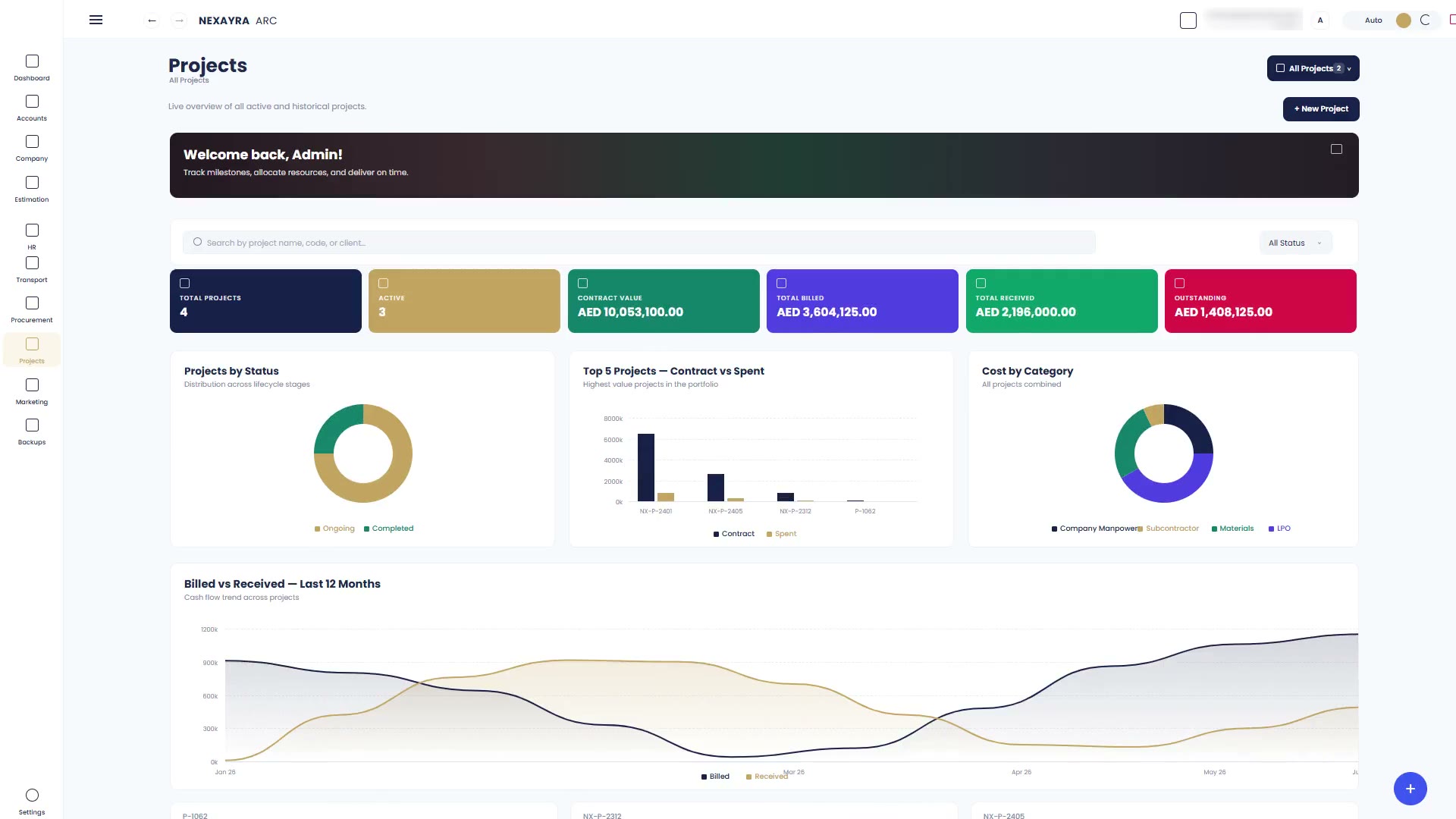
The Nex Build projects view filling in: total and active projects, contract value, billed, received and outstanding, then a status breakdown, contract against spend, cost by category and twelve months of billing against receipts.

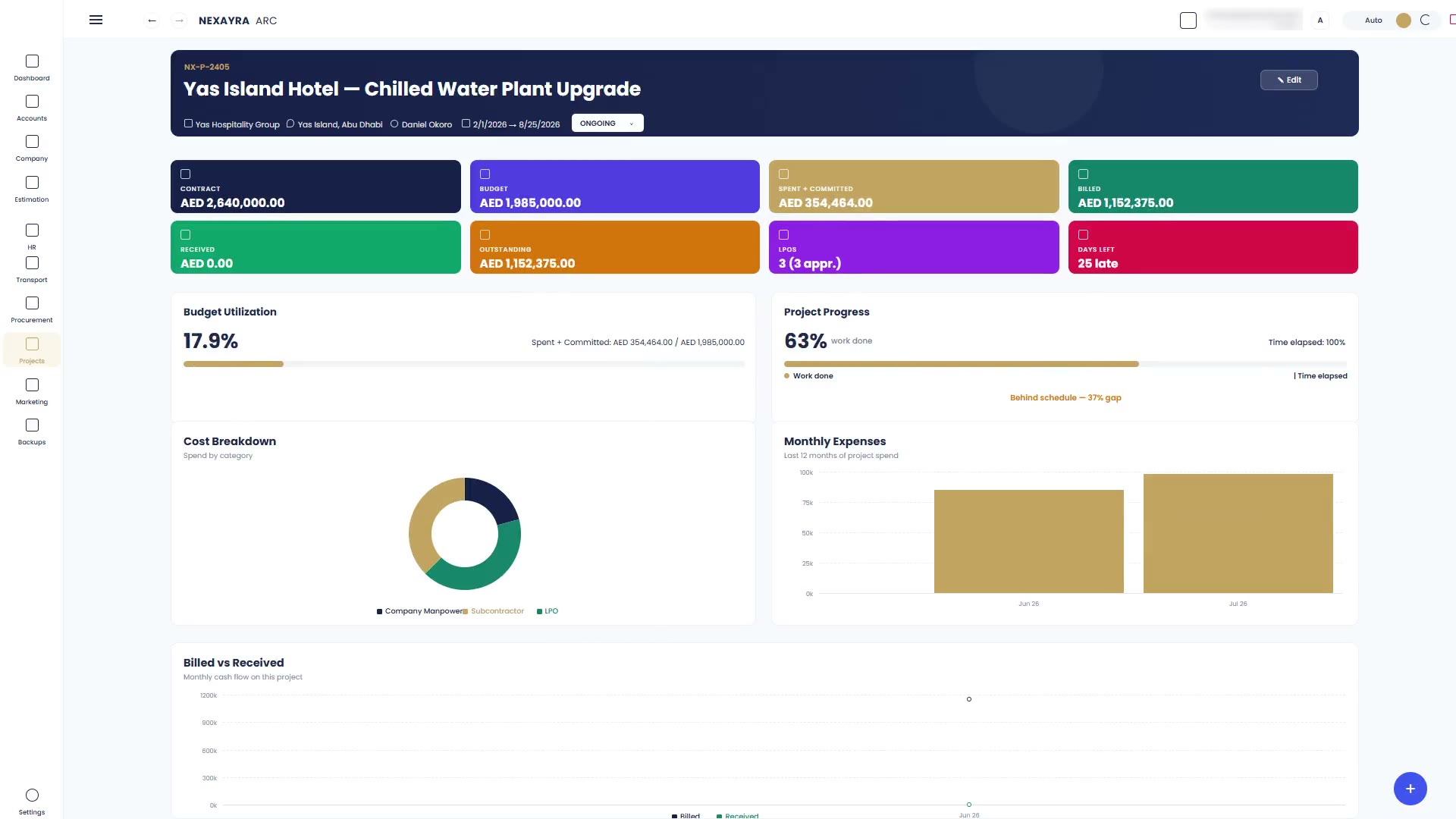
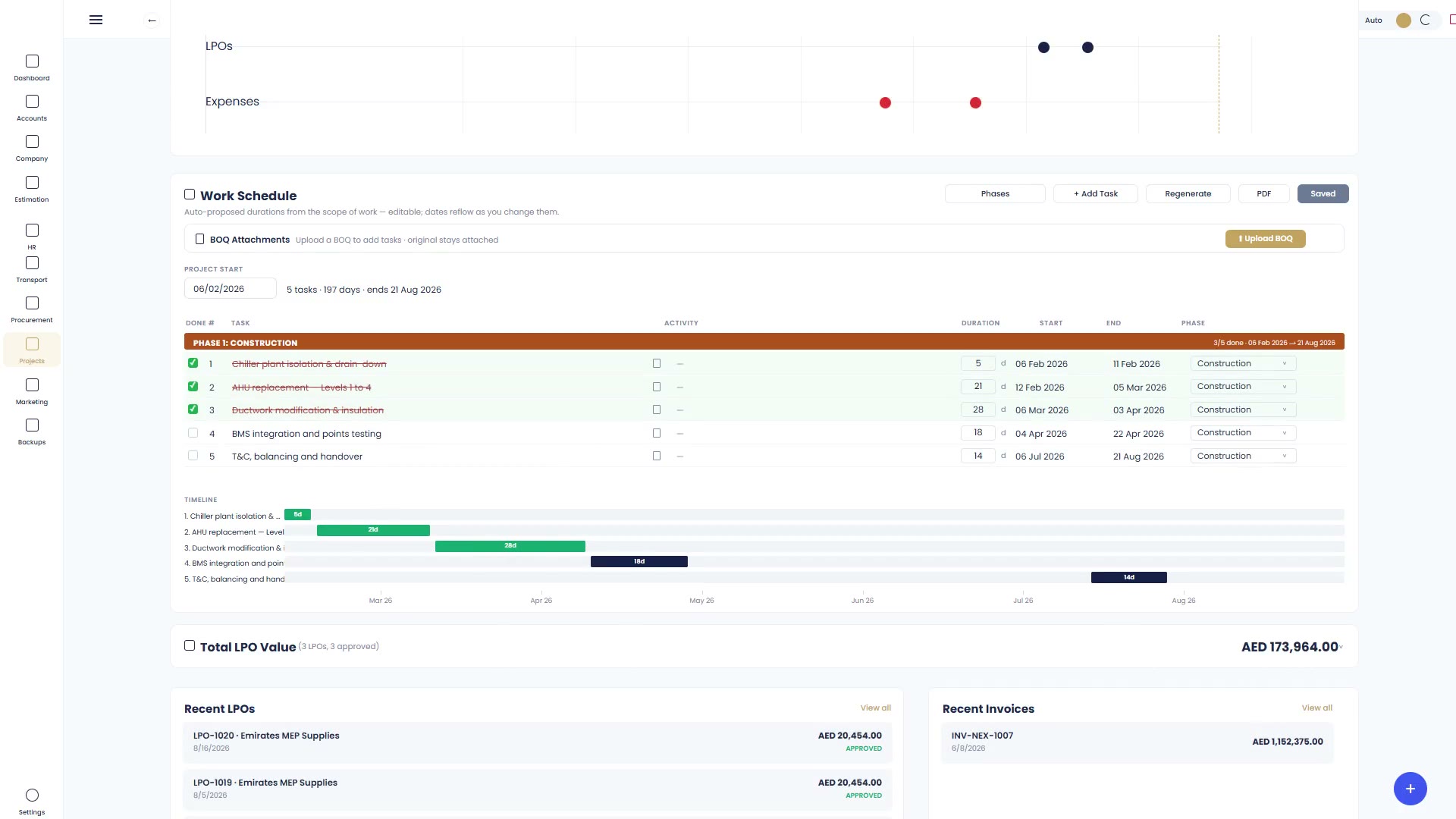
The Nex Build project view brings together the project's budget, costs, progress, billing and receipts.

The Nex Trade quotation shows the "Convert to Invoice" button that carries its details into a draft invoice.

The example data is invented. No customer information is shown.

Pick the one that matches the work.

Nex Build

Run the project without rebuilding the paperwork.

Keep your projects, estimates, purchases, accounts and payroll together as work progresses.

  • Projects and project costing
  • Estimation and quotations
  • Procurement and purchase orders
  • HR, timesheets and payroll
  • Vehicles, assets and possessions
  • Accounts, profit and loss, cash flow

Nex Trade

From quotation to payment without typing it twice.

Manage your quotations, invoices, purchases, stock and accounts in one place.

  • Quotations, invoices and receipts
  • Purchase orders, bills and payments
  • Stock with FIFO valuation
  • Banks, expenses and fixed assets
  • Eleven financial reports
  • Customer and supplier statements

Nex Core

Our engine. Your exact workflows.

An application built to fit the way you actually run your business.

  • Discovery call to start
  • Requirements agreed with you
  • Built to those requirements
  • Staged payments
  • Final payment on delivery

With every subscription

One company, three users
Your logo on every document
Two-factor authentication
Download all your records
Activity log
Support every day, including weekends

Know what the job is costing while it is still running.

A job can look busy and still be losing money. Finding out after handover leaves little room to act. Nex Build brings project expenses and budget utilisation into view while work continues. You can see where the money is going and compare spending with the budget before the job ends.

A Nex Build project filling in: contract, budget, spent and committed, billed, received and outstanding, then budget utilisation, progress against time elapsed, a cost breakdown by category, monthly expenses and billed against received.

Every part of the work.

Slide through what the software actually does.

Stock, valued properly

Items carry cost, selling price and quantity on hand. Stock is valued FIFO, and the cost of what you sold comes out of the same layers it went into.

Real accounting underneath, not a spreadsheet with a logo.

Nex Trade uses double-entry accounting. Every movement of stock or money must leave the books balanced before it completes. Your trial balance checks out because the software checks it.

Your paperwork should look like yours.

Your quotations, invoices, delivery notes, receipts, purchase orders, bills and payments print on your own letterhead. So do your report exports. Adjust the margins and preview a sample PDF before saving.

Same invoice. Three companies. Demo companies, invented data.

Download every record, any time you like.

In Nex Trade, download every record from the backups screen: one CSV per table, or all roughly 51 tables in a single zip. A dated history records those downloads. The activity log shows when something happened, who did it, the activity and what changed.

  • Invoices
  • Quotations
  • Purchase orders
  • Bills
  • Receipts
  • Payments
  • Items and stock
  • Customers
  • Suppliers
  • Bank transactions
  • Ledger entries
  • …and the rest

We built it to run our own work first.

The software began inside a contracting business in Abu Dhabi, where the same information kept being entered in three places. The two people running that company built software for their own work, then turned it into a product. Nexayra Technologies L.L.C is the separate, licensed software company they established in Abu Dhabi.

It started with paperwork that needed doing. Not a pitch deck.

Know the price before the call.

Three products, not three tiers. Each covers one company and three users.

Annual payment saves AED 300 a year on either subscription.

For contracting and site work

Nex Build

AED 100/ monthAED 1,200 a year

Run the project without rebuilding the paperwork.

  • Projects and project costing
  • Estimation and quotations
  • Procurement and purchase orders
  • HR, timesheets and payroll
  • Vehicles, assets and possessions

For trading and stock

Nex Trade

AED 125/ monthAED 1,500 a year

From quotation to payment without typing it twice.

  • Quotations, invoices and receipts
  • Purchase orders, bills and payments
  • Stock with FIFO valuation
  • Banks, expenses and fixed assets
  • Eleven financial reports

Built to your requirements

Nex Core

Per engagementNot a subscription

Our engine. Your exact workflows.

  • Discovery call to start
  • Requirements agreed with you
  • Built to those requirements
  • Staged payments
  • Final payment on delivery

No setup costs.

Compare the three side by side

Try it for fourteen days.

  1. 01

    Contact us through the form or WhatsApp.

  2. 02

    We set up your account and send you the login.

  3. 03

    Use it for fourteen days. No card or payment details.

Request free trial

What does my subscription include?

Your Nex Build or Nex Trade subscription covers one company and three users: one admin and two others. Extra users are AED 100 each, paid once — that user stays yours, including at renewal. There are no setup costs.

What happens when my trial ends?

If you go ahead, the same account continues and everything you entered during the trial stays with you. If you do not, your trial account and all its data are deleted in full.

Which one do I need?

Choose Nex Trade for trading stock, sales, purchases and accounts. Choose Nex Build for contracting projects, costs, procurement and HR. Nex Core is for an application built around your requirements, priced for that engagement.

How do I contact support?

By WhatsApp or email, every day including weekends. Support covers onboarding, day-to-day questions, anything that goes wrong, and training your team if you want it.

Is two-factor authentication available?

Yes. You can turn on two-factor authentication for your account, so signing in needs more than a password.

How does a Nex Core project work?

It starts with a discovery call, followed by meetings to establish your requirements. The application is then built to those requirements. The price depends on what you need. Payments are staged, with the final payment on delivery.